Cursor vs Windsurf (2026): They Cost the Same Now — Here's the Real Difference
Note (June 2026): Windsurf has been rebranded to Devin Desktop by Cognition. It's the same product — plans, pricing, settings, and extensions all carried over unchanged in an automatic update. This comparison uses both names, since "Windsurf" is still widely searched and the JetBrains plugin keeps the Windsurf name.
For most of 2025, the Cursor vs Windsurf decision had a lazy shortcut: Windsurf was cheaper. That shortcut is gone. In March 2026 Windsurf raised its Pro plan from $15 to $20 a month — the exact price Cursor charges. Two AI code editors, both forked from VS Code, both built around frontier models like Claude Sonnet 4.6 and GPT-5, now sitting at the same price.
So the question is no longer "which is cheaper." It's "which one matches how you actually want to work." And on that question, these two tools could not be more different.
The one-line answer: Cursor wants to code with you — you stay in control and approve each step. Windsurf wants to code for you — its Cascade agent runs multi-file changes with minimal babysitting. Pick based on which of those sentences sounds like relief and which sounds like a loss of control.
At a glance
| Cursor | Windsurf | |
|---|---|---|
| Pro price | $20/month ($16 billed annually) | $20/month (was $15 before March 2026) |
| Free tier | Hobby: ~2,000 completions + 50 premium requests/mo | Unlimited Tab + light daily Cascade quota |
| Philosophy | Controlled pair programming | Autonomous agent execution |
| Flagship feature | Composer + Background Agents | Cascade multi-file agent |
| In-house model | Auto mode (smart router, unlimited) | SWE-1.5 (fast, currently free) |
| IDE coverage | VS Code fork (one editor) | 40+ IDE plugins (incl. JetBrains) |
| Enterprise compliance | SOC 2 | SOC 2, HIPAA, FedRAMP |
| Owned by | Anysphere (independent) | Cognition (maker of Devin) |
| Best for | Most professional devs who want control + ecosystem | Autonomy seekers, JetBrains users, regulated industries |
Pricing: identical sticker, different meters
The headline number is the same, but the two bill you in fundamentally different ways, and that's where the real cost lives.
Cursor gives every paid plan a credit pool equal to its price (Pro = $20 of usage). The clever part is Auto mode: Cursor's smart router picks a cost-efficient model for each request, and Auto mode doesn't draw from your credit pool at all. For developers whose work is mostly routine, this means the $20 effectively goes much further. Heavy users who manually pin premium frontier models on every request will burn the pool faster and may want Pro+ ($60) or Ultra ($200).
Windsurf scrapped its credit system on March 19, 2026 and moved to daily and weekly quotas that refresh automatically. The upside: no end-of-month credit drought. The catch: the quota rewards consistent daily use and punishes bursty use. If you code intensely the week before a launch and barely touch it otherwise, you'll slam into the daily ceiling during crunch even though you have "capacity" left in aggregate. Windsurf's own SWE-1.5 model is currently free and doesn't burn quota, which softens this considerably.
Verdict: A wash on price, but the meters favor different people. Cursor's Auto mode is the better deal for variable, bursty workflows. Windsurf's quota is friendlier to steady, every-weekday coders. If your weeks look the same, Windsurf. If they don't, Cursor.
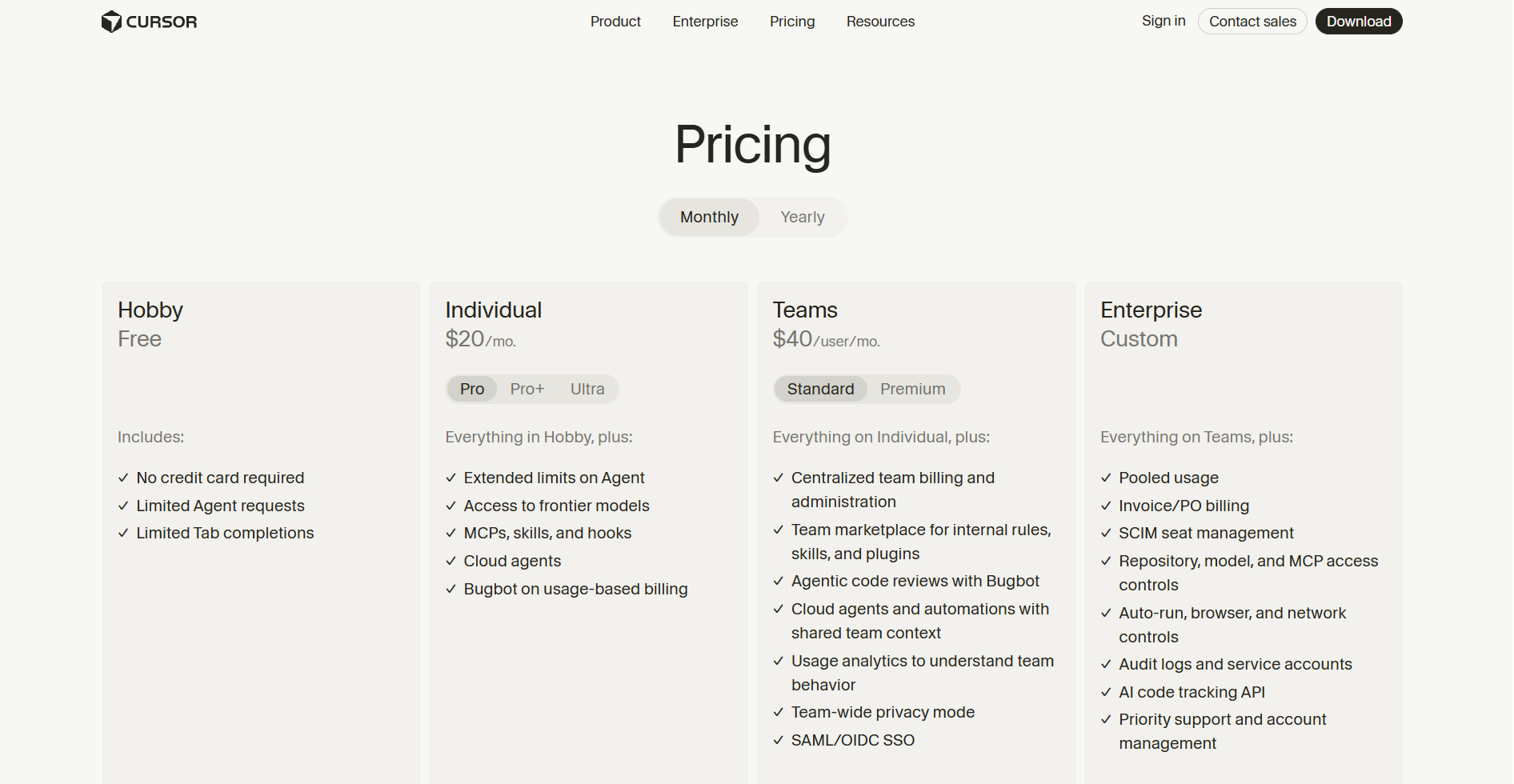 Cursor
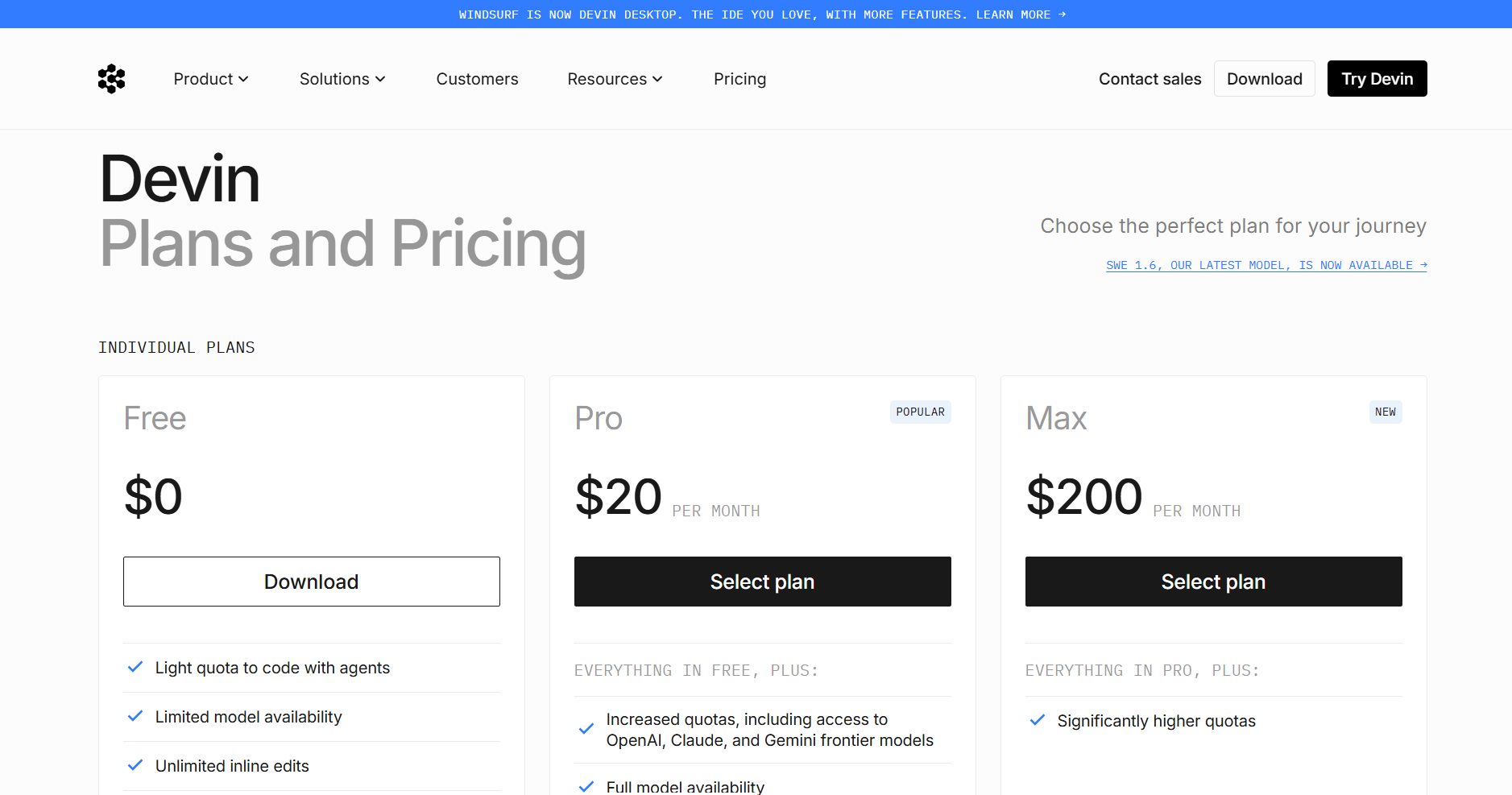 Devin
Devin
The core split: control vs autonomy
Everything else flows from this one difference.
Cursor's Composer works like a careful pair programmer. It proposes changes, you review the diff, you approve. You choose the model. You keep your hand on the wheel at every step. For developers who don't fully trust AI to touch their codebase unsupervised — which, surveys suggest, is still most of them — this is the entire appeal. You move fast but you never lose the plot.
Windsurf's Cascade works like a junior developer you've handed a task to. You describe the outcome, and it reads across files, writes, runs, and iterates through multi-step changes with minimal check-ins. When it works, it's genuinely less effort. When it goes sideways on a large codebase, you're reviewing a bigger blast radius after the fact.
Verdict: This isn't "better vs worse," it's a real fork in the road. If reviewing every diff feels like safety, choose Cursor. If reviewing every diff feels like friction you'd pay to remove, choose Windsurf.
Speed and autocomplete
Cursor acquired Supermaven, and its inline Tab autocomplete is widely regarded as the fastest and most accurate in the category — multi-line, context-aware, and quick enough to feel invisible. If you live in autocomplete, Cursor has the edge.
Windsurf's answer is SWE-1.5, its proprietary in-house "fast agent" model, currently free for all users during a promotional window. On raw agent throughput, Windsurf's published benchmarks are strong, and the free SWE-1.5 makes routine work cheap.
Verdict: Cursor wins inline autocomplete. Windsurf wins on agent speed and gives you a capable in-house model at no quota cost. Slight edge to whichever layer you spend more time in.
Ecosystem and IDE flexibility
This is Windsurf's most underrated advantage and the thing most comparisons skip. Cursor is a single VS Code fork — excellent if you already live in VS Code, a hard stop if you don't. Windsurf ships 40+ native IDE plugins, including JetBrains. If your team is on IntelliJ, PyCharm, or GoLand, that's not a minor convenience — it's the whole decision.
On the other side, Cursor has the larger community by a wide margin, which means more shared .cursorrules configs, more tutorials, more Stack Overflow answers, and faster help when you're stuck.
Verdict: Windsurf if you're not on VS Code or you need IDE breadth across a team. Cursor if you want the biggest ecosystem and community behind you.
Enterprise and compliance
For regulated industries this section is the entire comparison. Windsurf carries SOC 2, HIPAA, and FedRAMP — the kind of compliance posture that lets it into healthcare, finance, and government. Under Cognition's ownership it's leaned harder into enterprise. Cursor covers SOC 2 and serves large teams well, but if a compliance review flags HIPAA or FedRAMP requirements, Windsurf is often the only one that clears the bar.
Verdict: Regulated environment? Windsurf, usually by default. Standard commercial team? Either works.
Who should pick which
Choose Cursor if you:
- Already work in VS Code and want speed above all
- Prefer reviewing and approving each change
- Want the fastest autocomplete and the largest community
- Have variable, bursty coding weeks (Auto mode stretches the credit pool)
- Want a clean mid-tier ($60 Pro+) before jumping to $200
Choose Windsurf if you:
- Want an autonomous agent that handles multi-file work with less supervision
- Code in JetBrains or need plugins across many IDEs
- Work in a HIPAA or FedRAMP environment
- Code consistently most weekdays (the quota rewards steady use)
- Want a capable, free in-house model (SWE-1.5) for routine tasks
The honest bottom line
At identical prices, this comes down to temperament, not budget. Cursor is the safer pick for the majority of professional developers — VS Code familiarity, the best autocomplete, the biggest community, and a control-first workflow that most devs still want. Windsurf is the sharper pick for a specific profile: people who genuinely want to delegate to an agent, teams outside the VS Code world, and anyone with serious compliance needs.
If you're undecided, both have real free tiers. Spend a week in each on the same task. The one whose philosophy stops feeling like a setting and starts feeling like how you'd want to work anyway is your answer.
Frequently asked questions
Is Windsurf still cheaper than Cursor? No. Windsurf raised Pro to $20/month in March 2026, matching Cursor exactly. Developers who subscribed before March 19, 2026 keep the old $15 rate.
Are Cursor and Windsurf both based on VS Code? Yes — both are forks of VS Code's open-source core. They share that foundation but diverge completely in how their AI works once you start coding.
Which is better for beginners? Windsurf tends to have a gentler learning curve because Cascade handles more of the work autonomously. Cursor gives more control, which is powerful but asks more of a new user.
Which is better for large codebases? Cursor offers extended-context Claude (up to a 1M-token window) as a paid add-on, which helps when a problem needs holistic reasoning over a huge repo. Windsurf retrieves relevant chunks via RAG against a smaller window — efficient, but different.
Can I use Claude in both? Yes. Both provide access to frontier models including Claude Sonnet 4.6 and GPT-5.